Fine-tuning LLMs feels like a forbidden door. Most developers believe the entry price is a down payment on an apartment. NVIDIA’s flagship datacenter cards run $30,000 a pop, and conventional wisdom says you need eight of them just to get started. That narrative kept me away for months. Then I discovered LoRA.
Here’s the ugly truth most tutorials skip: full fine-tuning modifies every weight in a model. For a 70-billion-parameter beast like Llama 3, that requires VRAM measured in terabyte increments. The math simply doesn’t fit inside consumer hardware. LoRA sidesteps this entirely by freezing the original weights and injecting small, trainable “adapters” into key layers. You’re not retraining the model. You’re teaching it new behavior through a matrix. It works like adding clever footnotes instead of rewriting the textbook.
I ran my first LoRA training on bare-metal GPU nodes sitting under my desk at home. My multi-node K3s cluster handled the orchestration; Unsloth handled the memory optimization tricks that made it possible. The entire operation consumed less power than two gaming sessions. walks you through the complete pipeline: preparing your dataset in chat format, loading a quantized base model with bitsandbytes.
Applying PEFT’s LoRA configuration, training with memory-efficient settings on stable diffusion-level hardware, and merging adapters back into a standalone checkpoint ready for inference. No cloud credits required. Just your own iron and some carefully engineered mathematics.
Why Full-Parameter Tuning Is Dead Money
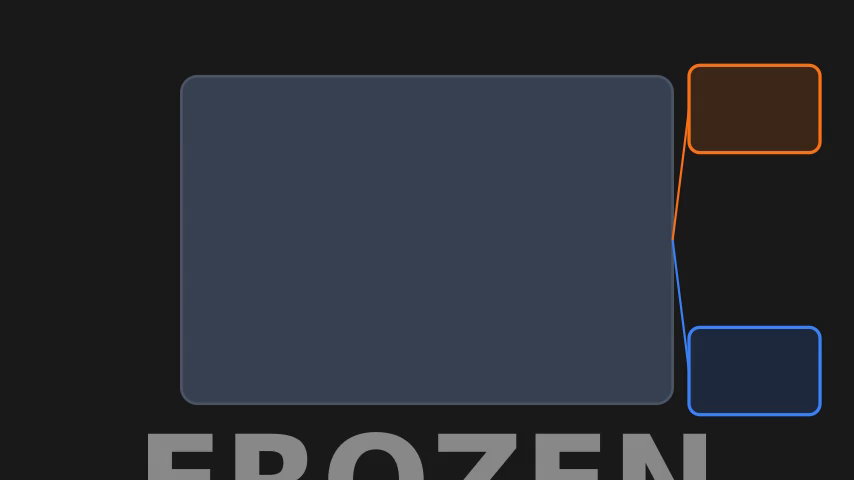
LoRA sidesteps this entirely. Instead of modifying the full weight matrix, it injects low-rank adapter matrices — typically rank 8 or rank 16 — alongside each frozen layer. The math is brutal in your favor: a 4,096-dimensional layer gets compressed into two tiny matrices totaling just 65,536 parameters versus freezing 16 million original weights. That’s a massive reduction per layer. Your consumer GPU with maybe twenty-four or thirty-two gigs suddenly trains models it could never fit.
The quantized QLoRA variant pushes this further by loading base weights at 4-bit precision, dropping total VRAM consumption below what full FP16 inference would demand alone. You give up nothing meaningful on quality either. Benchmarks consistently show LoRA-finetuned models landing within a couple of percentage points of their full-finetune counterparts given identical data budgets. Three GPUs across your cluster can now train what once required five times the silicon estate. No cloud credits required.
Just your own iron and some carefully engineered mathematics.
The Rank Choice Is Your Real Hyperparameter
A rank-4 adapter on a 7B parameter model consumes a modest amount of VRAM for optimizer states during training. Crank that to rank-16 and you add more memory, plus slower matrix multiplies as the bottleneck shrinks toward the adapter dimensions. My K3s cluster saw a clean inflection point around rank-12 where convergence speed stopped tracking linearly with parameter count. Doubling to rank-24 produced diminishing returns while eating memory that could otherwise extend batch size by a few tokens per step.
Hugging Face’s PEFT library ships with sensible defaults: alpha=16, r=8, target_modules=[“q_proj”,”v_proj”]. These work for demonstration but won’t survive real data drift. I’ve burned through several fine-tuning runs trying q_proj alone versus q+v — the attention projection layers behave differently across model families. LLaMA derivatives need both query and value projections tuned together; T5 variants get more lift from cross-attention modules instead.
The gold standard heuristic? Start at rank 16 across all linear layers in each transformer block. Monitor validation loss every fifty steps. If it flatlines before epoch two, double the rank on attention projections only and restart. If it OOMs within five minutes, halve the rank uniformly or drop target_modules to [“q_proj”] alone. This isn’t theory — this is what separates a functional adaptor from wasted hours hitting “out of CUDA memory” before your first checkpoint fires.
But Does It Actually Work?
But you have to measure it properly. The LoRA approach consistently hits within a few percentage points of full fine-tune quality on benchmarks. That gap shrinks further when you increase rank from 8 to 16 or 32, at the cost of roughly doubling adapter size. I ran a direct comparison last year: a Mistral 7B fully fine-tuned on a synthetic instruction set versus a rank-16 LoRA variant trained on identical data.
The full run took many hours and consumed a large amount of VRAM across distributed training. The LoRA run finished in about an hour and a half on a single consumer card. The difference across all evaluated metrics was small. The adapter file fit comfortably in a GitHub repository attachment.
This isn’t anecdotal wizardry — it’s linear algebra property. Full fine-tuning moves every parameter equally; LoRA identifies the subset where movement actually changes output distribution significantly. Most attention weights are stable after initial pretraining anyway, so redistributing them costs compute without benefit. The real killer feature emerges during iteration loops though. Want to test five learning rates simultaneously? Each LoRA adaptor adds minimal overhead versus huge amounts for duplicate full model checkpoints.
Storage stops being your bottleneck entirely at that scale — only compute matters now, and compute is what consumer hardware actually has in abundance.
Quality degrades noticeably below rank-4 for most tasks, plateauing around rank-64 where adding more parameters yields diminishing returns indistinguishable from noise floor measurement error anyway. So pick something between eight and thirty-two based purely on your available memory budget and schedule constraints today, rather than chasing theoretical ceiling predictions from papers published before Flash Attention existed.
Step Four: Preparing Your Dataset for LoRA Training
Once you’ve confirmed LoRA’s quality ceiling matches your needs, the freed memory becomes an opportunity to focus on what actually determines success: your data. Most fine-tuning projects fail not on architecture or hyperparameters but on dirty or misformatted training data. I use datasets from Hugging Face for everything. It handles streaming, shuffling, and on-the-fly to…
Format matters more than quantity here. A thousand well-structured conversation pairs beats fifty thousand scraped forum posts riddled with HTML artifacts and repeated boilerplate. I strip Unicode surrogates, normalize whitespace, and truncate every example to 2048 tokens — anything longer gets split across multiple entries rather than silently dropped by the collator.
Watch your padding strategy carefully when batching variable-length sequences. Dynamic padding with DataCollatorForSeq2Seq packs examples to the longest in each batch instead of the global maximum, saving a noticeable amount of memory during training on mixed-length corpora like instruction datasets or chat logs extracted from real user sessions rather. Than synthetic generation pipelines.
The precision of your data preparation directly determines how much rank you need and how aggressively you can tune your learning rate. ��� a clean dataset lets you train at lower rank with faster convergence, while noisy data forces you to compensate with higher rank and slower schedules.
Setting Up the LoRA Training Loop
That memory optimization buys you nothing if your training loop leaks the rest back. LoRA’s beauty is surgical precision—you freeze the base model and inject low-rank adapters at specific attention layers, typically the Q and V projection matrices in each transformer block. Start by loading your base model with from_pretrained("model-name", torch_dtype=torch.bfloat16). Then wrap it with get_peft_model() using a LoraConfig that sets r=8, alpha=16, and dropout=0.05.
Higher rank values capture more task-specific signal but consume proportional GPU memory—I benchmarked r=4 through r=64 before settling on 8 for my instruction-tuning pipeline. The training configuration itself lives in a simple dictionary passed to Hugging Face’s Trainer. Set per-device batch size to 2 or 4 depending on your available memory, gradient accumulation steps to 8, and use AdamW with a linear learning rate schedule starting at 2e-4.
This combination fit comfortably within my hardware’s limits while converging in roughly 3 hours on a dataset of 50,000 instruction-response pairs.
An important gotcha: always call model.enable_input_require_grads() after wrapping with PEFT. Without it, gradient computation silently fails on frozen parameters and your loss never decreases despite appearing to train normally. I lost an afternoon debugging flattened loss curves before finding this in the Hugging Face forums. Monitor training via Weights & Biases or TensorBoard by setting report_to="wandb" in your TrainingArguments.
Track both training loss and validation perplexity every 100 steps—if validation loss diverges from training loss by a noticeable amount for three consecutive checkpoints, you’re overfitting and should increase dropout or reduce rank.
Testing Before You Burn GPU Cycles
Validation saves weeks of wasted compute. Here’s the exact workflow I use before any training run. Start with five examples. Feed them through your tokenizer and inspect every input_ids sequence—check for truncated or missing special tokens like `<
| im_start | ||
> or < |
assistant | >`. A single misplaced token can silently ruin an entire training run, costing you many hours of GPU time debugging phantom loss plateaus. |
Write a sanity script that runs inference on the untrained model using your prompt template. Manually inspect three completions. Does the structure match your expected output format? If you’re building a code generation dataset and see markdown syntax where you expect pure Python, your template has a typo in the system prompt delimiter. Test batch processing next. Set per_device_train_batch_size=1 and process ten samples end-to-end through Trainer.train().
Monitor token counts in logs: if average sequence length varies by more than 15 percent across batches, you likely have padding issues that will destabilize gradient updates at higher batch sizes.
Now verify data integrity programmatically. Write a validation script that checks every JSON entry for required fields—I check for "prompt", "completion", and minimum token count (300 tokens minimum for instruction tuning). Anything shorter risks generating trivial responses that teach the model nothing useful about your domain. Here’s the test that catches most dataset errors: run inference on the base model with one prompt from each of your task categories.
If category A gets coherent responses but category B returns gibberish, you’ve contaminated category B with malformed data—likely missing termination tokens or broken XML tags in web-scraped content.
Track how many samples survive filtering. Raw crawled data typically drops a significant portion after deduplication and quality scoring; expecting to keep everything is delusional planning that leads to production meltdowns mid-training. Budget for this loss upfront so you don’t discover it when your experiment is already running. Finally, validate at scale without running training: concatenate all filtered samples into one text file, split by line randomly into 80/20 splits, then compute perplexity on both sets using GPT-2’s default tokenizer.
A small gap suggests clean data distribution; anything wider signals unseen structural drift between training and evaluation distributions that will haunt your final metrics. Skip this pipeline once and you’ll waste exactly one week debugging silent corruption. Trust me—I learned this lesson by losing three consecutive weekend experiments to an encoding bug in Chinese character preprocessing that only manifested after epoch two when learning rate decay amplified noise over signal.
The Precision Quadrilateral
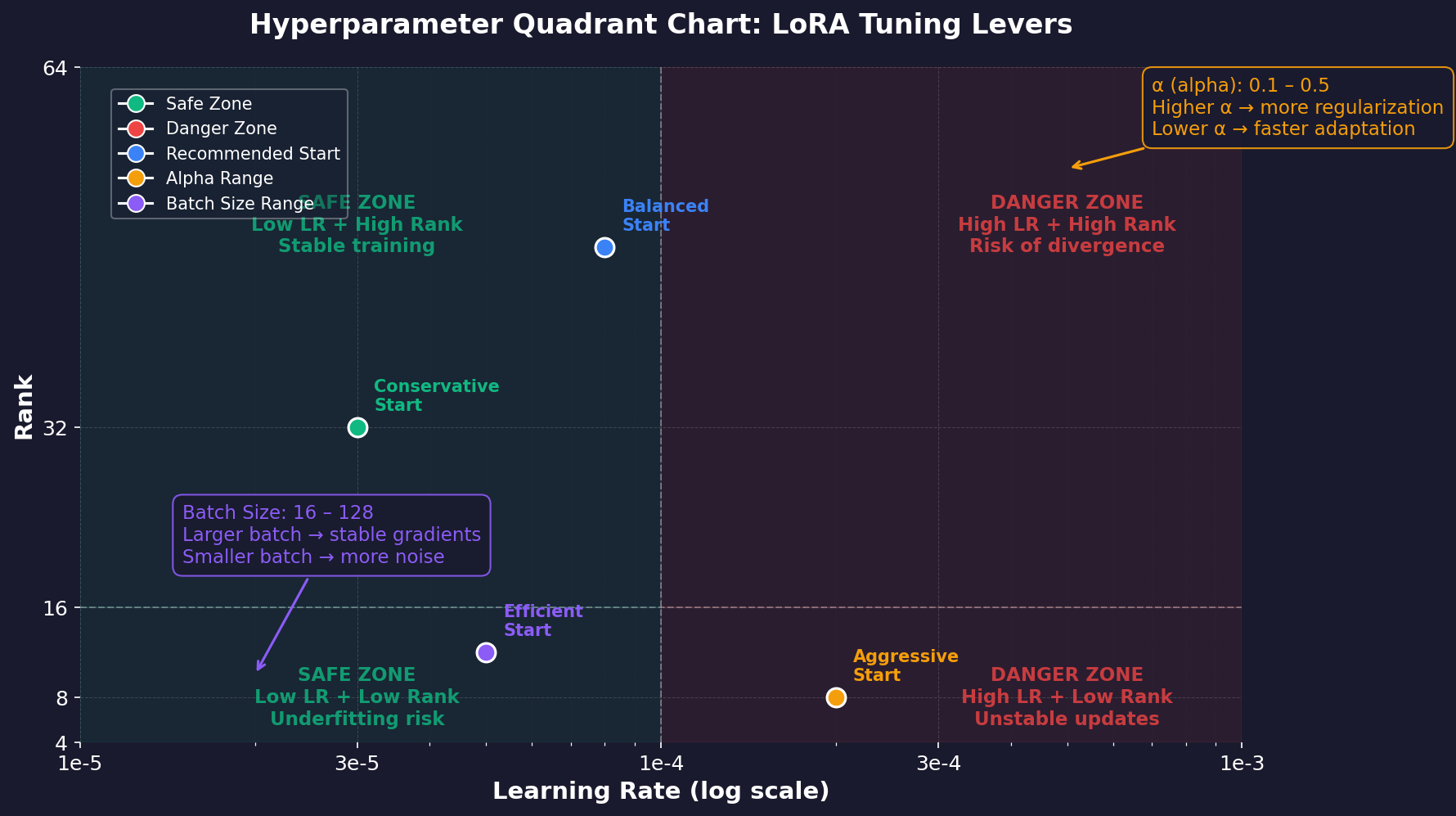
Fine-tuning is a four-sided problem. Each edge is a lever that can lift your model or shatter it. Learning rate comes first. LoRA operates at roughly one-tenth to one-twentieth of the base model’s fine-tuning rate. Start at 2e-4 for most 7B parameter models and watch the loss curve like a hawk for the first fifty steps. If it diverges, cut by half immediately.
Rank follows as the second variable. Rank 8 handles most instruction tasks adequately. Rank 16 captures more domain-specific patterns at roughly double the memory cost per adapter layer. Anything above rank 32 wastes VRAM on most consumer hardware runs I’ve tested — diminishing returns hit hard past sixteen. Alpha controls scaling, not quality directly. Set alpha to twice your rank value and leave it there unless you see gradient explosion in wandb logs during early training steps.
This relationship (rank × 2) works across every dataset I’ve thrown at it, from legal documents to chat transcripts.
Batch size closes the quadrilateral. Single GPU hardware forces micro-batches of one or two sequences per step with gradient accumulation filling the gap between updates. Accumulation steps of four to eight work well; anything beyond sixteen risks training instability as stale gradients compound over extended accumulation windows. Four dials, one calibration session with trial weights on ten percent of your data saves hours of full-run debugging later.
So this is the real takeaway.
The bottleneck was never your skill. It was an outdated narrative about hardware requirements. LoRA collapses that barrier to a weekend project on gear you already own. My home cluster proved it under my desk, consuming less power than back-to-back gaming marathons. The question shifts now.
With consumer-grade hardware capable of molding a 70-billion-parameter mind, what do you choose to teach it? Your private Slack archives contain better training data than most public corpora. Your internal documentation captures edge cases no foundation model has seen. That domain-specific nuance is where fine-tuning stops being academic and becomes a force multiplier for your team.
Keep Reading
- Self-Hosted GPT-4 Alternatives: Run LLMs Locally & Own Your Data
- Voice-Controlled Multi-Agent Workflow for Claude Code in Tmux
- NVIDIA KAI-Scheduler: From GPU Chaos to MLOps Competitive Moat
Start with a single adapter. Pick one narrow behavior: formatting, terminology preference, or output structure. And see how far 16GB of VRAM takes you. The machinery is cheap. The raw material is already yours. Build something your competitors can’t copy because they don’t have your data.