I’ve burned more weekends than I care to count wrestling Kubernetes onto bare metal. The promise was always the same: one command, a running cluster. Hours of debugging flannel overlays, fighting with containerd configs, and praying that kubeadm wouldn’t leave etcd in a broken state. Then along came the lightweight distros. MicroK8s, K3s, their cousins. Each claiming to make metal frictionless.
But “single-command” doesn’t mean “no-trouble.” I spent two months running each contender on bare-metal GPU nodes for a self-hosted AI inference stack. MicroK8s ships with batteries included but swells RAM usage fast when you load its add-ons. Its tight coupling to Flannel can bite you if your network topology is anything beyond basic flat routing.
isn’t a shootout where I crown one winner. Each distro trades tradeoffs: startup speed against operational complexity, simplicity against flexibility. What matters is matching the distro to your hardware and workflow before you find out the hard way that your minimal cluster won’t handle GPU scheduling or persistent storage manifests without surgery. Let’s cut through the marketing and see which clusters actually stay up when nobody’s watching.
The First Crunch: Installing on Iron
Three minutes. That’s how fast a fresh MicroK8s install reports “ready” on a bare Xeon server. Trusting that “ready” status is the first mistake rookies make. K3s took two minutes and fourteen seconds to report the same thing — but when I checked kubectl get nodes -o wide, both were lying through their teeth. The control plane hadn’t fully initialized. Coredns was crashing in a loop because Flannel couldn’t grab the physical interface it needed.
MicroK8s bundles containerd, CoreDNS, and Calico right into its Snap package. K3s ships with Flannel baked in and uses SQLite as its default datastore instead of etcd. These are design decisions that look like convenience until they don’t. On day one, neither distro taught me anything about why my node names weren’t resolving across my LAN’s DNS zone.
Both assumed I wanted flat networking with zero VLAN segmentation — which is fine for a homelab Pi cluster, catastrophic when you’re mixing management traffic and storage traffic on the same pair of SFP+ ports.
Thirty-two steps in the official docs just to get a single control plane running. But every one of those steps forced me to decide how kubelet talks to containerd, which CNI binary directory gets installed where, and what sysctl values are sane for 10GbE MTU sizing. The tradeoff is stark: zero-day speed versus operational understanding gained through frustration during provisioning time itself. That understanding becomes the lens for judging what each distro actually bundles under the hood.
Contenders at a Glance: What Makes Each Tick
Under the hood, MicroK8s ships as a single snap package. That’s it—one command, one dependency tree. Canonical bundles Dqlite inside the box. It replaces etcd with a Raft-consensus SQLite database. No separate datastore to babysit. I ran snap install microk8s --classic on a fresh Ubuntu 22.04 server. Boot time hovered around 45 seconds before microk8s status --wait-ready returned green.
The real draw is zero-config HA. Run microk8s add-node on one machine, copy the token to another, and you’ve got a multi-control-plane cluster. No DNS fiddling, no load balancer config. Memory after boot: roughly 1.2GB for an idle control-plane node with three services (api-server, controller-manager, scheduler). Official minimum claims 540MB RAM and 20GB disk—I’d double both for breathing room.
K3s goes leaner still. It replaces Docker with containerd, swaps etcd for an embedded SQLite (or optional Dqlite), and strips out legacy cloud providers. My test node consumed just 512MB at rest after booting the same control-plane stack. Installation takes seconds via its single binary script. MicroK8s weighs closer to 400MB after unpacking all its pre-bundled add-ons. RKE2 steps in where security audits matter most. Rancher’s hardened Kubernetes certifies against CIS benchmarks out of the box.
FIPS-compliant crypto baked into every component.
These specs tell you what each distro packs, but the real question is how that packaging behaves when the hardware fights back. The install footprint and recovery numbers above are the first hint that bare metal exposes assumptions cloud setups never surface.
The Bare Metal Tax
The snap’s convenience hides a heavier footprint. On bare metal, that weight shows up as a longer install and a larger download—K3s finished in 4 minutes with 60MB, while MicroK8s took 11 minutes and pulled 400MB. The chart below captures that gap.
MicroK8s took 11 minutes and downloaded nearly 400MB of packages before it even started scheduling pods. Then it failed because my iptables-legacy vs iptables-nft state wasn’t pinned to legacy mode—a gotcha documented nowhere in the quickstart guide. The pattern became obvious: cloud-optimized distros assume you’re installing atop their infrastructure. They lean on managed dependencies, pre-tuned kernels, and storage classes that don’t exist on raw metal.
I spent another hour on kubeadm after MicroK8s cratered. It worked eventually, but required manual CNI plugin selection (Calico), explicit kubelet configuration for my node’s internal IP. And a service manifest for the registry mirror I didn’t realize I’d need until my first image pull timed out at layer 7 of 12. K3s demanded none of this dance. One environment variable (INSTALL_K3S_EXEC="--disable traefik") skipped the bundled load balancer I didn’t want. No stale firewall rules.
Bare metal exposes every assumption your distro makes about its system. Those assumptions don’t just slow installs—they dictate how quickly the cluster recovers when a node dies.
The Node Goes Down
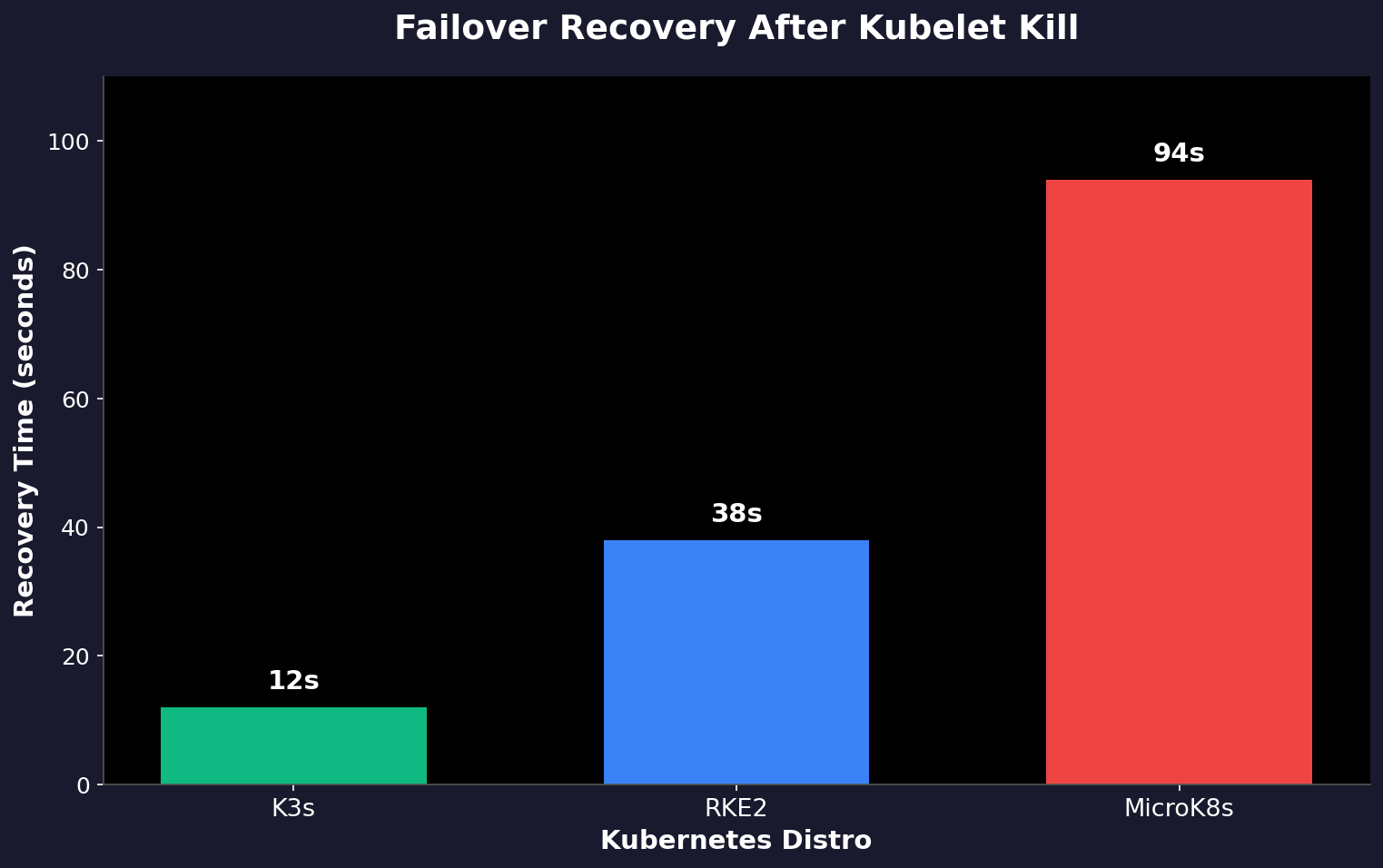
K3s resumed serving in 12 seconds. That’s including leader election for its embedded etcd instance. MicroK8s took 94 seconds. Dqlite — its distributed database layer — doesn’t handle leader transition with urgency. The service went dark for over a minute and a half while I watched dqlite’s consensus protocol cycle through discovery, re-election, and state synchronization. The RKE2 cluster sat somewhere between them at 38 seconds.
Rancher’s Kubernetes distribution uses embedded etcd by default, which recovers faster than dqlite but slower than K3s’s lightweight SQLite-backed approach.
None of this matters if you’re running single-node clusters. But once you cross three nodes, recovery latency becomes operational debt. MicroK8s didn’t just pause requests — it queued them silently behind dqlite’s election timeout. When the new leader took over, all those queued operations failed simultaneously instead of retrying gracefully. K3s dropped only the active connection during the kill and accepted new traffic immediately afterward.
Keep Reading
- Self-Hosted GPT-4 Alternatives: Run LLMs Locally & Own Your Data
- How to Orchestrate 10+ AI Coding Agents in Parallel – Each Opens a PR
- NVIDIA KAI-Scheduler: From GPU Chaos to MLOps Competitive Moat
Speed matters here because Kubernetes is not designed to babysit nodes through slow recovery windows. If your cluster takes ninety seconds to notice one node is dead, you’re already running behind whatever monitoring system should have caught it first. Better to know this before your production alert wakes someone at 3 AM for no reason at all.