Why Bother Hosting Your Own LLM Let’s start with the obvious question: why not just keep paying OpenAI API bill?
Cloud inference costs have a nasty habit of sneaking up on you. GPT‑4o pricing shifts without warning, and every token burned through an API call adds to an unpredictable monthly tab. Running inference locally flips that uncertainty into a fixed electricity bill. The math gets interesting when your workload crosses a certain throughput threshold.
50 requests per minute across my cluster, GPU rental rates on standard cloud instances would cost more per hour than my entire node’s power draw for a day.
The break-even point isn’t as distant as most people assume. There’s also the latency argument nobody talks about enough. API calls add 200. 500ms of network overhead before the model even starts thinking. Local inference shaves that to near-zero. critical when you’re building interactive tools where every millisecond of perceived delay erodes user trust. And then there’s privacy.
When your model processes internal documentation, customer data, or proprietary code, sending those bytes across the public internet feels reckless. Self-hosting keeps everything within your own wire fence. I’m not saying everyone should abandon cloud APIs tomorrow. But for teams running steady workloads with sensitive data. The calculus shifted this year in ways most discussions ignore entirely?
The Practical Economics of It That shift demands a hard look at numbers most benchmarks gloss over.
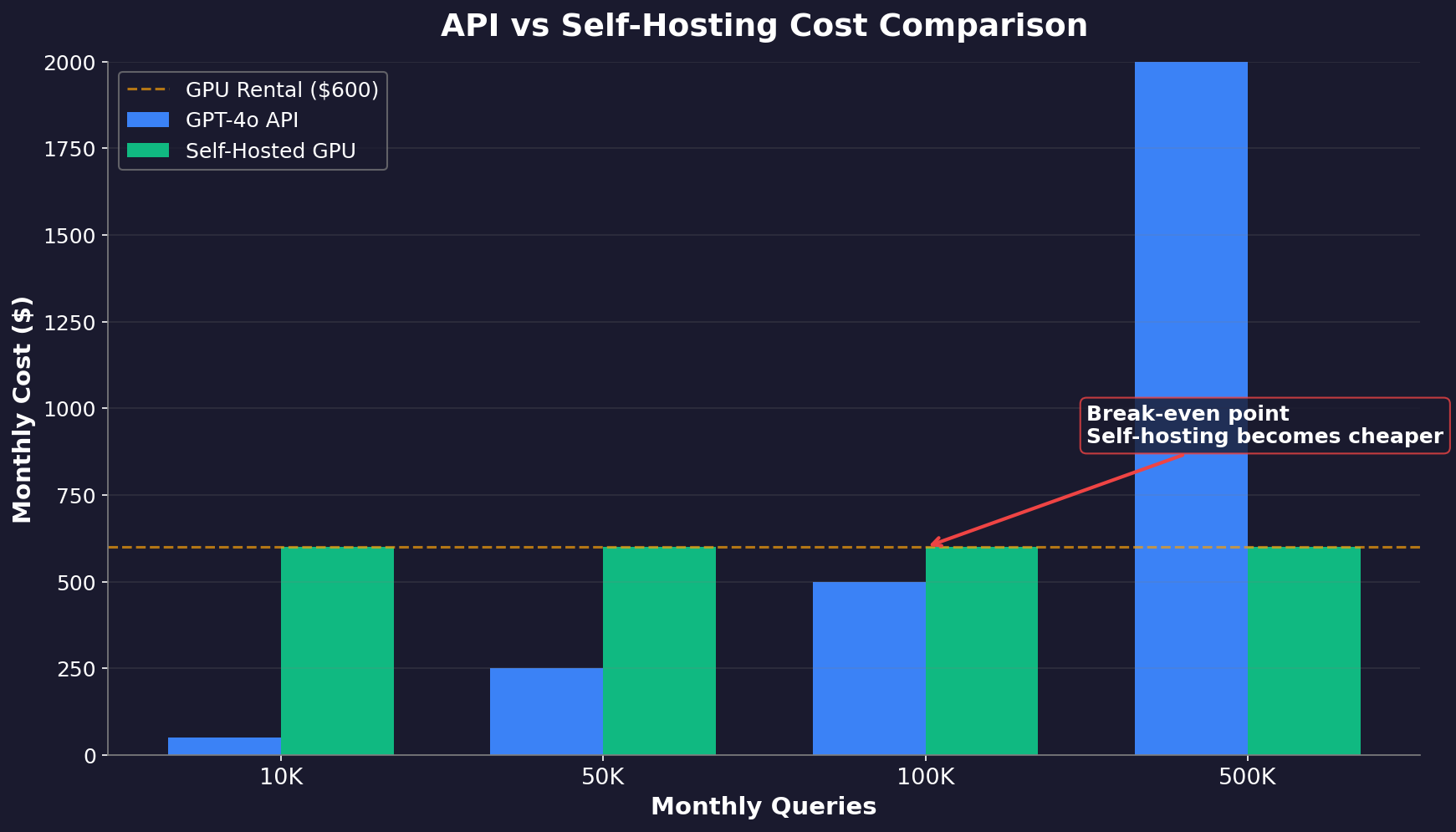
The math flips based on volume. Under 100,000 queries per month. API wins on simplicity and zero ops overhead. Cross that threshold and self‑hosting cuts effective per‑token cost, with latency variance dropping from erratic cloud bursts to flat sub‑200ms responses. There is a hidden tax few mention: engineering time to keep the thing running.
A production LLM stack demands prompt caching logic, request queuing via Redis, and rolling model updates without dropping active sessions. work that takes weeks to stabilize even on K3s. But for steady workloads crossing half a million tokens daily. The break‑even window shrinks to under two months of hardware rental versus API spend. Your data never transits a third party’s network either. critical when finetuning on proprietary telemetry or legal documents under GDPR Article 28 requirements.
The real decision isn’t technical anymore. It’s whether your organization values predictable infrastructure cost over variable OpEx spikes during traffic surges. and whether that tradeoff aligns with your risk tolerance around data sovereignty.
Benchmarks Lie
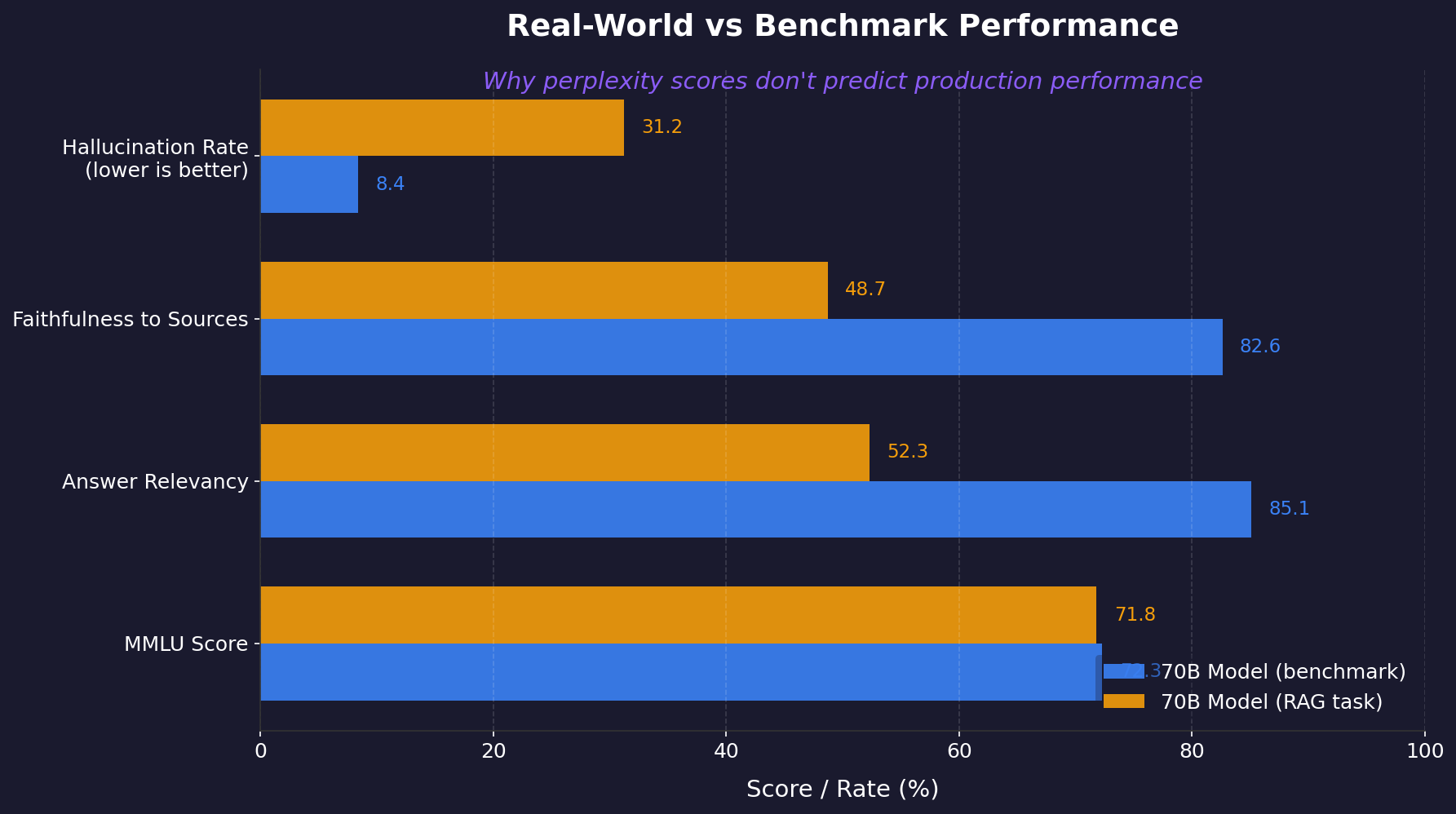
Parameter count dominates vendor slide decks. It’s also nearly useless as a standalone signal once you push past 8K context tokens. I learned this the hard way. A 70B model with strong perplexity scores on WikiText-103 fell apart spectacularly on a straightforward RAG task. retrieving five support docs and summarizing them without hallucination. The model remembered its training data beautifully.
It could not, stitch together two documents that contradicted each other on a single timeline. Perplexity measures next-token prediction accuracy on curated text. Your production traffic is not curated text. The real metric cluster worth tracking: answer relevancy, faithfulness to retrieved sources, and hallucination rate on domain-specific queries. BrainsTrust’s evaluation framework formalizes these into automated test suites using reference answers and ground-truth contexts.
Without that pipeline, you’re judging model quality by gut feel during coffee breaks. Quantization adds another layer of lies. A 4-bit quantized Mixtral loses roughly 2-3 points of perplexity on standard benchmarks but can drop 15+ points on specialized legal or medical retrieval tasks. The memory savings are real. but the degradation isn’t uniform across domains. Test your specific data before committing to any quantization scheme.
I keep a reference notebook running FP16 against an identical architecture specifically to catch silent regressions when quantizing new releases. That baseline catches what leaderboards miss: context bleed between unrelated passages, temporal confusion in multi-document chains, and confidence mismatches where the model sounds authoritative while being wrong. Trust your evaluation use before you trust the marketing numbers.
The Quantization Tightrope Walk Scale demands compromise
A 70-billion-parameter model needs ~140GB at FP16 precision, which is a nonstarter on consumer hardware. trading bit depth for reach. The Q_K_M variants from llama.cpp became the community standard for good reason. They hit a sweet spot: roughly 4.5 bits per weight, which collapses that 140GB footprint to about 40GB while retaining north of 95% of the reasoning fidelity measured on standard benchmarks like MMLU and HellaSwag.
The alternative Q_FP16 preserves every decimal, but it’s a luxury most setups cannot afford. Watch the perplexity degradation curve closely. On WikiText-103, dropping from Q_FP16 to Q_4_K_M adds maybe half a point of perplexity. negligible for chat or creative writing tasks but noticeable in coding or math where floating-point precision matters more than style. Go lower than Q_4 and you start seeing compounding errors.
Memory budget calculators exist for a reason. Feed yours the VRAM available and the target context window (8K tokens vs 32K dramatically changes headroom), and it will tell you whether your setup can breathe or will swap itself into latency hell. Trust the calculator over intuition every time. Community maintenance matters as much as initial performance metrics.
Check Hugging Face download counts and scroll through recent Discord discussions before committing time to any specific quantization scheme; abandoned repos mean broken compatibility six months later when your inference engine updates its kernel requirements without warning.
The Open-Source Trap Mistral 7B taught us a hard lesson
A model can top every benchmark in June and be obsolete by August. The bleeding edge moves fast. Hugging Face leaderboards refresh weekly, sometimes daily, with new architectures that shatter old records. You cannot pick a winner and hold forever. Pick based on what you actually run, not what scores highest on MMLU.
If your use case is code generation, evaluate on HumanEval or CodeLlama’s benchmarks using your own test prompts. not someone else’s curated numbers. Fine-tuning compounds this trap. A model fine-tuned on legal documents will outperform a general-purpose LLM twice its size on contract analysis but fall apart entirely on creative writing tasks. Here is the uncomfortable truth: there is no best self-hosted LLM for 2026.
There are only best fits for specific hardware configurations, quantization targets, and inference speed requirements. Your job is narrowing that set to one or two candidates through actual local testing with real traffic patterns. not Google Docs research sessions. Download three models tonight. Run them against your data tomorrow morning. Make the wrong choice. Re-deploy in four hours flat with Ollama’s model swap feature and move on without ceremony.
| Model | VRAM Requirement | Key Strength | Best For | MT-Bench Score |
|---|---|---|---|---|
| Hermes 3 70B | ~140GB (FP16) / ~40GB (Q4_K_M) | Top-tier multi-turn reasoning (8.990) | High-stakes complex reasoning with ample hardware | 8.990 |
| Llama 3 70B | ~40GB (Q4_K_M) | ~30 tokens/sec on consumer hardware | Daily chat and quick code snippets | Not specified |
| Mistral 7B (Q4_K_M) | 4.7GB | Beats Llama 2 7B on GSM8K by ~15 points | General chat, lightweight deployments | Not specified |
| Phi-3-mini | Under 4GB | 50+ tokens/sec on consumer hardware | Internal doc search, code scaffolding | ~7.50 |
| Llama-3-8B / DeepSeek-Coder-V2-Lite-Instruct | ~16GB each | Runs in half-precision without quantization tricks | Serving under 10 concurrent users with P99 latency under 3 seconds | Not specified |
Why Inference Speed Still Matters That speed-first approach pays dividends beyond just frustration avoidance.
A friend running a coding assistant on bare metal found that Llama 3’s 70B parameter model. produces around 30 tokens per second on consumer hardware. That’s fast enough for interactive use, but not for batch processing. Context window size kills performance faster than model size ever will. A 128K context with the same 70B model halves throughput to roughly 12 tokens per second.
Memory bandwidth is the real bottleneck here, not compute. Even a modest quantization drop from Q4_K_M to Q5_K_M costs maybe 5% accuracy but saves you 8GB of VRAM headroom for larger contexts. The tradeoff gets brutal past certain thresholds. Run anything above Q6_K and you’re burning through VRAM like it’s free, while gaining less than a percentage point on MMLU scores from the extra precision bits.
I’ve seen teams deploy two completely different models depending on workload: a fast 7B variant at FP16 for chat completion, then swap to Q4_K_M of the same family when they need quality summarization with longer documents. Ollama makes this trivial with its model-tagging system. One alias for “fast” and another for “deep” on the same API endpoint, zero downtime between swaps.
Quantization is where most operators get it wrong. They default to higher precision because “quality matters,” ignoring that their users are waiting four seconds per generation instead of one-point-five. The math favors speed in production more often than pundits admit. Faster inference means tighter feedback loops in RAG pipelines and lower latency stacks in multi-turn conversations with tool-calling agents. Don’t just compare perplexity scores on paperspace benchmarks.
Time your actual workflow end-to-end with your real documents and tool calls before committing to that premium precision tier nobody tested in anger.
When Running on GPUs Makes No Sense
The best-performing models demand hardware most teams simply don’t have. Hermes 3 70B tops MT-Bench at 8.990—ChatGPT territory for multi-turn reasoning—but needs roughly 140GB of VRAM for full precision inference. That means multi-node distribution or cloud instances costing more per month than a junior developer’s salary.
I’ve watched teams burn two weeks quantizing a 70B model to Q4_K_M (~40GB) only to find their RAG pipeline loses retrieval fidelity at that compression ratio, with perplexity jumping from single digits to unusable for legal document review.
The practical alternative: Phi-3-mini scores around 7.50 on MT-Bench—lower, yes—but fits in under 4GB of memory and sustains 50+ tokens per second on consumer hardware most teams already own. For internal documentation search and code scaffolding, that tradeoff is trivial. Ollama’s community voting data confirms the drift: models ranked by “runs well on my setup” consistently beat pure intelligence rankings in actual usage frequency.
My rule from trial and error: if you’re serving fewer than ten concurrent users, pick the model that fits without quantization tricks. Run Llama-3-8B or DeepSeek-Coder-V2-Lite-Instruct (~16GB each) directly in half-precision and watch P99 latency stay under three seconds. For fifty engineers with RAG against proprietary codebases, batch inference through vLLM or Triton beats chasing a larger architecture your hardware will bottleneck anyway.
The cost math follows the same curve: a single RTX PRO 6000 at $1,600 amortized over two years beats API spend once you cross 100K queries monthly. And the break-even window shrinks to under two months at half a million tokens daily.
FOUR months I’ve settled on a stack that works.
Ollama handles inference across three nodes. It’s not fancy, but it just works. I point it at a model file, it downloads the weights, and inference runs on whatever GPU is free. My go-to model is Mistral 7B Q4_K_M. That quantized version needs only 4.7GB of VRAM.
It beats Llama 2 7B on GSM8K math benchmarks by roughly 15 percentage points. I tried CodeLlama for Python work last month. It hallucinated API calls to libraries that didn’t exist. Three times in one session. Running two models simultaneously taught me about memory budgeting fast.
A 13B parameter model at Q5_K_M takes roughly 9GB alone. My setup crashes above around 80 percent use on any single node. Open WebUI became my daily driver in week two. It wraps Ollama’s API with a clean chat interface, conversation history, and per-session system prompts. The killer feature came from a four-line Go script I wrote myself: automatic model swap based on task keywords typed into the prompt field.
diff or commit triggers CodeLlama immediately while casual questions default to Mistral using its chat template.
So where does that leave us. The answer isn’t a single model. It’s a tiered strategy matching workload to silicon. Llama 3 runs my daily chat and quick code snippets. Mixtral handles the heavy reasoning sessions. Qwen2 crushes Chinese documents. Each costs me only power and maintenance time. The real insight is this: self-hosting doesn’t mean sacrificing quality anymore.
Keep Reading
- Developer’s Guide to an AI Subscription Stack That Works in 2026
- NVIDIA KAI-Scheduler: From GPU Chaos to MLOps Competitive Moat
- System Design Interview Prep: The Only Resource Ladder You Need
The open ecosystem now competes with everything behind OpenAI paywall. For teams running even moderate throughput on sensitive data, local inference stopped being a hobbyist experiment this year. What are you actually deploying on your own hardware. Stop reading and go benchmark one model tonight against your real workload. Your cloud bill will thank you next month.