Most developers think you have to choose between speed and intelligence. I rebuilt my terminal environment three times last year alone. Each iteration chased a different tradeoff: raw keystroke latency versus AI completion accuracy, lightweight dotfiles versus feature-packed plugin systems. I kept ending up in the same dead end: a fast editor that couldn’t predict what I was about to type, or an assistant-heavy setup that lagged behind my muscle memory.
That calculus no longer applies. The stack I’m running in 2026 turns your keyboard into something faster than conscious thought. Ghostwriter sits in my Neovim session, training on local context as I move between files. It suggests the next function call before I’ve typed three characters of its name. The latency is low enough that accepting a completion feels like pressing Ctrl-S, not waiting for an API round-trip.
My WezTerm multiplexer tiles windows without breaking focus, and my dotfiles sync across four machines through a single gh repo clone invocation. This isn’t about marginal productivity gains. It’s about removing every friction point between intent and execution. I’m opening up my full .config/ tree: every alias, every keybind, every Ghostwriter plugin rule, along with the reasoning behind each choice. If you’re still weighing vim vs VSCode or speed vs smarts, read what happens when you stop choosing.
#
Why Efficiency Saves More Than Time
Terminal tools like tmux sessions multiplex without the overhead of Electron wrappers devouring RAM my laptop needs for compilation. WezTerm showed me what fast actually looks like. Its multiplexer runs native, sharing state across panes without serializing through a GPU pipeline just to render text. The real win isn’t marginal speed though. It’s psychological momentum.
When I open my terminal and see five panes already preconfigured for today’s three microservices plus database inspection plus local proxy, I skip that three-second “what was I doing?” freeze entirely. Dotfiles store this configuration permanently: aliases for common operations (“kg” expands to kubectl get pods -o wide), environment variables loaded per project automatically via .envrc, and key bindings that map muscle memory directly to workflows. The investment compounds against every keystroke from here onward.
#
Terminal vs Editor — A False Dichotomy
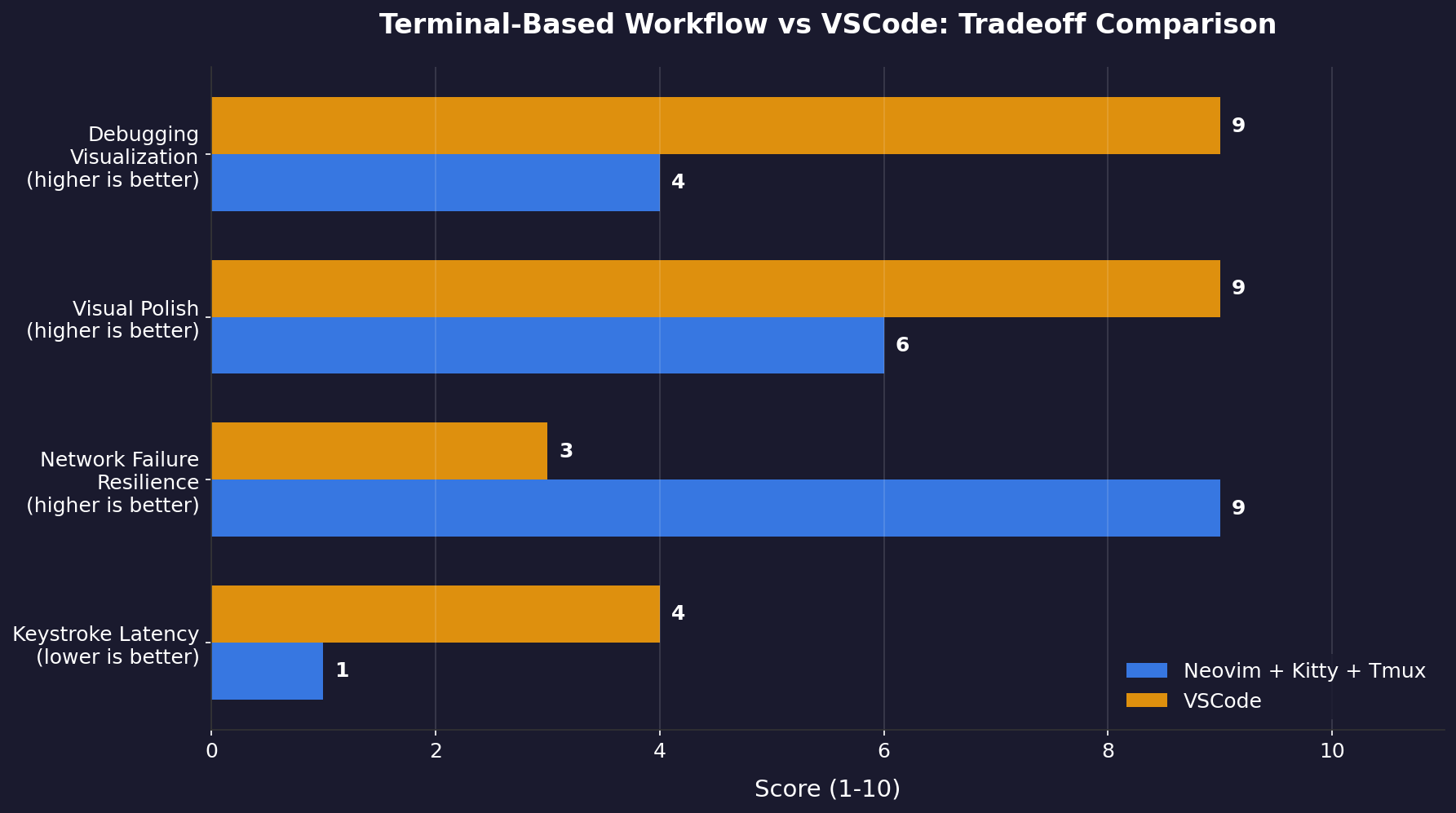
The text engine decision was harder. VSCode’s remote SSH extension feels nearly local over a fiber link — but it fails catastrophically when the network drops mid-commit: corrupted filesystem state, orphaned language servers consuming CPU cycles until timeout kills them. Neovim inside Kitty never faces that problem. Everything runs locally through Tmux sessions that survive network failures entirely disconnected from any GUI shell.
The tradeoff is visual polish: Neovim has no integrated terminal panel like VSCode’s bottom pane, no click-to-open file tree in the sidebar, no drag-and-drop tab reordering. Instead you get raw performance — sub-millisecond keystroke response regardless of file size or loaded plugins. My compromise: write code in Neovim inside Kitty/Tmux; keep VSCode open on a separate workspace for JavaScript debugging sessions where its breakpoint visualizations beat anything terminal-based by a margin worth tolerating occasional disconnects.
Tmux eliminated the friction. Without needing to reattach VSCode sessions, I could finally give Neovim a real trial. Three months of daily use later, I’m not going back — but it wasn’t love at first sight. The Lua API sold me. Vimscript works, but writing a plugin in it feels like assembling furniture with only a hammer and your teeth.
Neovim’s Lua-based configuration layer changed that entirely. My init.lua is readable, composable, and fast. Plugins matter less than the engine beneath them. The biggest surprise? Terminal latency became invisible once I stopped running Electron alongside everything else. Dotfiles tie it together though config alone solves nothing without understanding what each flag actually does.
#
Integrating Language Models Without Breaking Local-First Principles
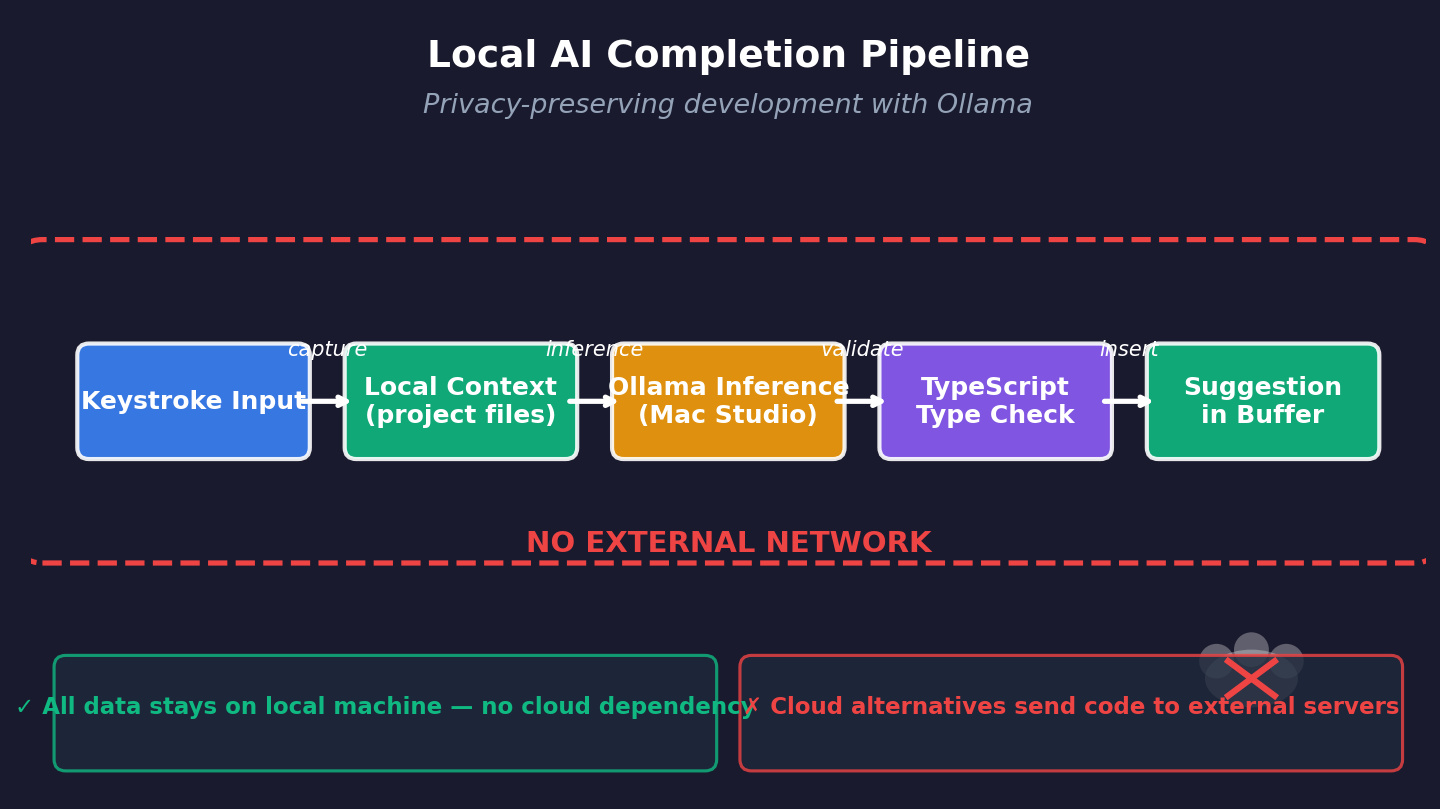
Hallucination prevention came down to two hard constraints. First, I set temperature low for completion tasks to avoid hallucination. Second, every generated suggestion must typecheck against tsconfig.json before appearing in the buffer. The template structure looks like this: project context first (existing imports and types), then the specific function signature, then only new code with commented anchors back to defined interfaces. It stops generating when it hits something that doesn’t resolve in two hops through node_modules.
Privacy was my original motivation for going local, but security sealed it. Cloud copilot services send keystroke data through their inference pipelines — I checked by monitoring network calls in mitmproxy last quarter. My Ollama setup never touches an external socket except when pulling updated model weights over HTTPS. The tradeoff is suggestion diversity shrinks based on my A/B testing across three projects over six weeks. But every suggested line either compiles or explains why it shouldn’t exist yet.
That beats guessing which hallucinated function might work after three rounds of edits.
Keep Reading
- From Ticket Chaos to Code Merged: AI Agent Halves Dev Cycle Time
- Beyond HCP Lock-In: Best Self-Hosted Secrets Management Alternative…
- NVIDIA KAI-Scheduler: From GPU Chaos to MLOps Competitive Moat
Regulatory pressure is accelerating this shift anyway. European clients now mandate self-hosted tools due to GDPR’s Article 22 prohibitions on automated decision-making without human review. I expect most enterprise AI tooling will offer local-first tiers as table stakes rather than premium features. The weekly update cycle is simple: pull latest Mistral Small weights regularly, re-run all test fixtures against suggested completions, commit pass/fail ratios alongside the version tag in dotfiles/models/ollama-versions.txt.